

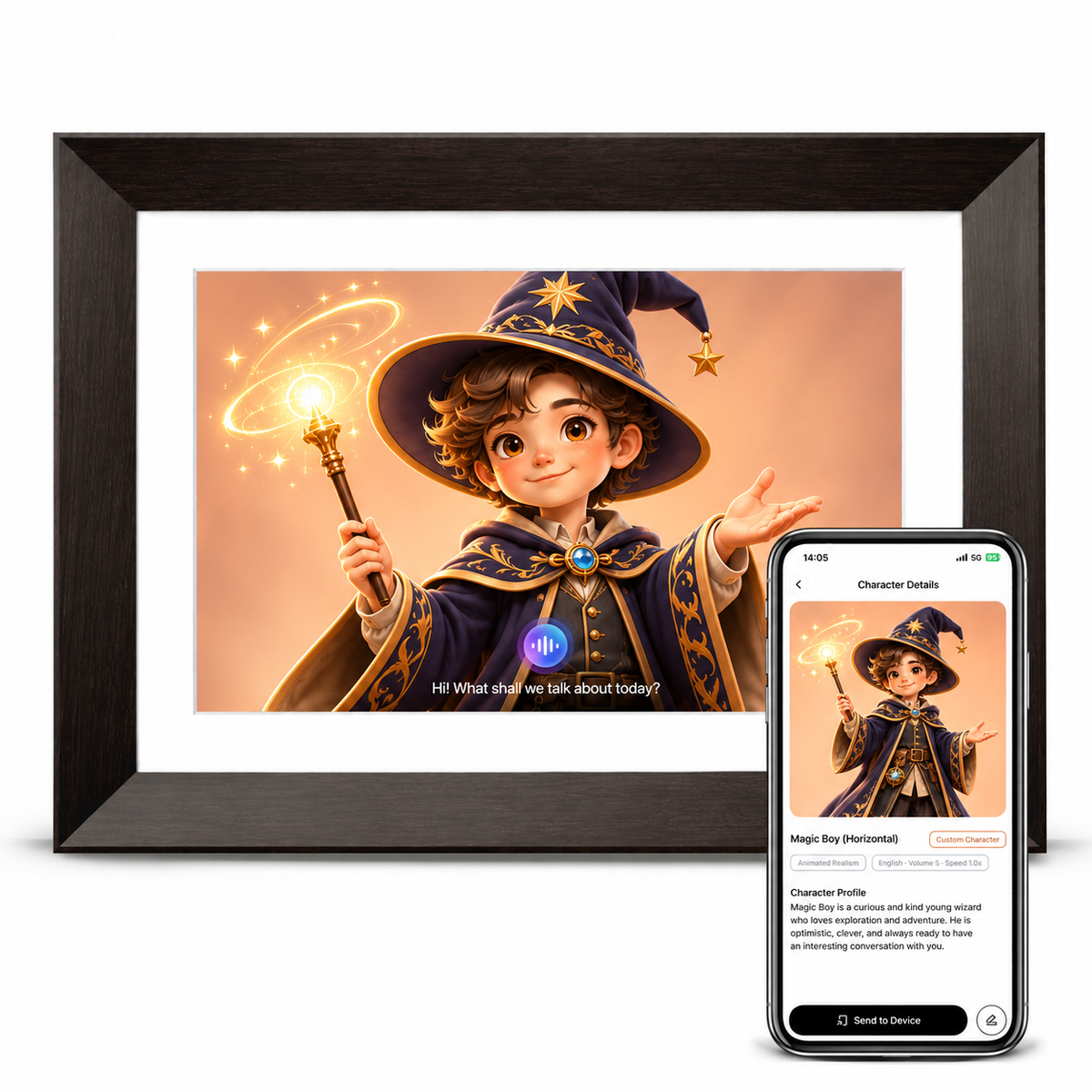

Every few weeks another “AI for the home” gadget lands in my feed, and most want to run your house. The VINABOT 21.5-inch AI photo frame made a different bet: it wants to talk back.
On the 21.5-inch screen, AI Companion brings characters on the frame to life with voice and real-time conversation. It can welcome office visitors, answer curated hotel or exhibit questions, or become talking artwork, a seasonal host, a study helper, or a healthy-living guide at home.
Preset Q&A supports approved answers to matched questions, while a Knowledge Base helps the character use selected documents. Choose a system voice or a Voice Clone you are authorized to use. The frame has no camera, and conversational memory is designed to help interactions feel more continuous over time without assuming the AI will remember every detail from every previous conversation.
The useful part is not simply giving a picture a voice. It is giving that character a clear role, the right information, and a reason to be there.
Why the 21.5-inch model suits an AI Companion
A regular digital frame is designed to show photos. An AI digital photo frame with AI Companion adds a voice-led conversation around a selected image or character.
On the VINABOT 21.5-inch model , that character can sit at eye level in a lobby, exhibition, or living room rather than being confined to a phone-sized screen.
The 21.5-inch model has a 1920 × 1080 IPS touchscreen and can be used in portrait or landscape orientation, including as a wall mounted digital photo frame. Portrait suits a character or artwork; landscape works well beside wider visual content.
To create an AI Companion, choose a portrait, define its profile and speaking style, then configure a system voice or an authorized cloned voice. You can also add Preset Q&A and supported reference material to its Knowledge Base. The frame has no camera; AI Companion works through voice and on-screen content.
Business: a large digital photo frame with a defined role
1. Company or office: a first-stop welcome guide
A portrait character in a reception area could greet visitors, explain where to check in, and answer recurring questions such as office hours or which floor hosts a meeting.
Preset Q&A is a practical fit for answers that should stay fixed, while an approved Knowledge Base can hold general company or visitor information. Keep the character’s job focused, and update its source material whenever building details change.
2. Restaurant: explain the menu without guessing
A restaurant could use a character to introduce the dining concept, describe selected dishes, or direct guests toward staff for detailed dietary questions.
Exact, approved information such as opening hours or set-menu descriptions can sit in Preset Q&A, while a Knowledge Base can provide deeper background on ingredients, dishes, or the restaurant’s story.
3. Café: a conversational menu-side display
In a café, a friendly character could suggest a drink from a short, curated menu, explain the origin story of a featured roast, or answer common questions about ordering.
A portrait-style interactive digital photo frame can sit near a counter or seating area without taking over the room. Because menus and prices change, keep its source material current and use Preset Q&A for anything that needs an exact answer.
4. Hotel: answer common guest questions
A hotel could prepare a character to explain where breakfast is served, what time check-out is, or how to find a listed amenity.
The Knowledge Base can hold the property’s approved guest guide, while Preset Q&A handles a short set of fixed questions. It works best as a conversational information and wayfinding layer, with the front desk still available whenever a request needs human judgment or action.
5. Museum or exhibition: add a voice to the wall text
A museum could create a character that introduces an artwork, explains a curator-approved theme, or answers common questions about an exhibit.
With a portrait-based work, the character might speak in a fictional first-person voice as an interpretive experience. Visitors should simply be able to tell when the response is creative interpretation rather than a historical quotation.
A Knowledge Base can draw from approved exhibit notes, while Preset Q&A can pin down artist names, dates, opening information, or accessibility directions. The 21.5-inch format makes this especially useful for portrait, landscape, and wall-mounted exhibition displays.
Everyday life: from talking artwork to guided routines
6. Talking artwork: a Mona Lisa-inspired conversation
At home, a public-domain artwork such as the Mona Lisa can become a conversation piece when interpreted through an AI character.
Instead of a silent reproduction, the portrait might pull you into a conversation about its setting, clothing, or the stories people have told about the painting. What it says is generated interpretation, not the real historical subject’s words or a museum’s official account.
The same idea works with a licensed print, a family-made illustration, or a fictional portrait. A large interactive digital photo frame can become part of the room’s visual identity while still offering something unexpected when someone starts talking to it.
7. Seasonal characters: Santa, a storyteller, or a springtime guide
A seasonal character can make a familiar display feel new again. Santa might answer a child’s questions about holiday traditions, suggest a winter story, or ask what decoration they like best.
Later, the same screen can become a spring garden guide or a Halloween character. Preset Q&A works well for stable, family-approved answers, while the Knowledge Base can hold story notes or other reference material.
8. Tutor for children: practice with material adults select
A character could help a child rehearse spelling words, review a science topic, or practice a short conversation in another language.
Parents or teachers can shape its role and provide age-appropriate material through the Knowledge Base, while Preset Q&A reinforces a smaller set of reviewed facts or instructions. It works best as an interactive practice tool, with adults still choosing the material and staying involved.
9. Personal life assistant: make household information easier to ask
A home character can answer questions based on information you choose to provide: how to use an appliance, where the household keeps recycling instructions, or what ingredients are in a saved recipe.
The Knowledge Base can hold that reference information, while Preset Q&A returns precise answers to recurring questions. It can also pick up on household routines, personal preferences, and daily information, while conversational memory helps later interactions feel more continuous. It is not a smart-home controller or autonomous task manager, but it can make everyday information much easier to ask for.
10. Wellness and healthy-living coach: offer a gentle prompt
A wellness-themed character can guide a short breathing exercise, offer a gentle stretch prompt, suggest a walking goal someone has chosen, or give everyday encouragement toward healthier habits.
It can use a calm system voice or an authorized Voice Clone and works best once it has a clearly defined role. Wellness scenarios should stay focused on general lifestyle guidance rather than medical diagnosis or treatment.
Set expectations for voice, answers, and memory
AI Companion supports a system voice or a compatible Voice Clone made from a voice you own or have permission to use. A system voice is often the most straightforward option for a business guide or fictional character.
Preset Q&A is designed for fixed answers: when a question matches one of the entries, the companion returns the answer you supplied. A Knowledge Base gives it selected documents to draw on for related questions.
These tools can make an experience more relevant and consistent, but they do not guarantee every answer will always be correct. Test likely questions and update the source material whenever menus, schedules, exhibits, policies, or routines change.
Conversational memory is designed to make repeated interactions feel more continuous over time, but users should not expect AI Companion to remember every detail from every previous conversation. For more about character setup and related AI tools, see the AI Creation Guide .
The point is not to make the frame a person. It is to give the content already on your wall a voice — one you can shape, update, and switch whenever you like.
Frequently Asked Questions
What exactly is VINABOT AI Companion?
AI Companion is a feature that turns selected visual content into an interactive character with voice and real-time conversation. You define the role and speaking style, then choose a system voice or an authorized Voice Clone.
Does AI Companion need a camera?
No. VINABOT has no camera. AI Companion works through voice and on-screen content rather than video capture.
Will it remember our past conversations?
Conversational memory is designed to help interactions feel more continuous over time, but users should not expect it to remember every detail from every previous conversation.
Can AI Companion use a cloned voice?
Yes. AI Companion can use a compatible Voice Clone made from your own voice or a voice you are authorized to use. A system voice is also available.
How is AI Companion different from AI Creation?
AI Creation generates or transforms photos and videos from a prompt or reference image. AI Companion takes selected visual content and makes it conversational, allowing the character to speak and respond in real time rather than simply display generated media.



发表评论
所有评论在发布前都会经过审核。
此站点受 hCaptcha 保护,并且 hCaptcha 隐私政策和服务条款适用。